
The same elegant pattern — now in Rust, with cargo-lambda and the AWS SDK for Rust.
The old pattern I picked up from Jeremy Daly many years ago hasn’t changed — it’s still one of the cleanest foundations for a serverless API. What has changed is what we write our Lambda functions in.
Rust has become a genuinely first-class choice for AWS Lambda in 2026: cold starts measured in milliseconds, memory usage a fraction of a Node.js runtime, and the AWS SDK for Rust is now stable and production-ready.
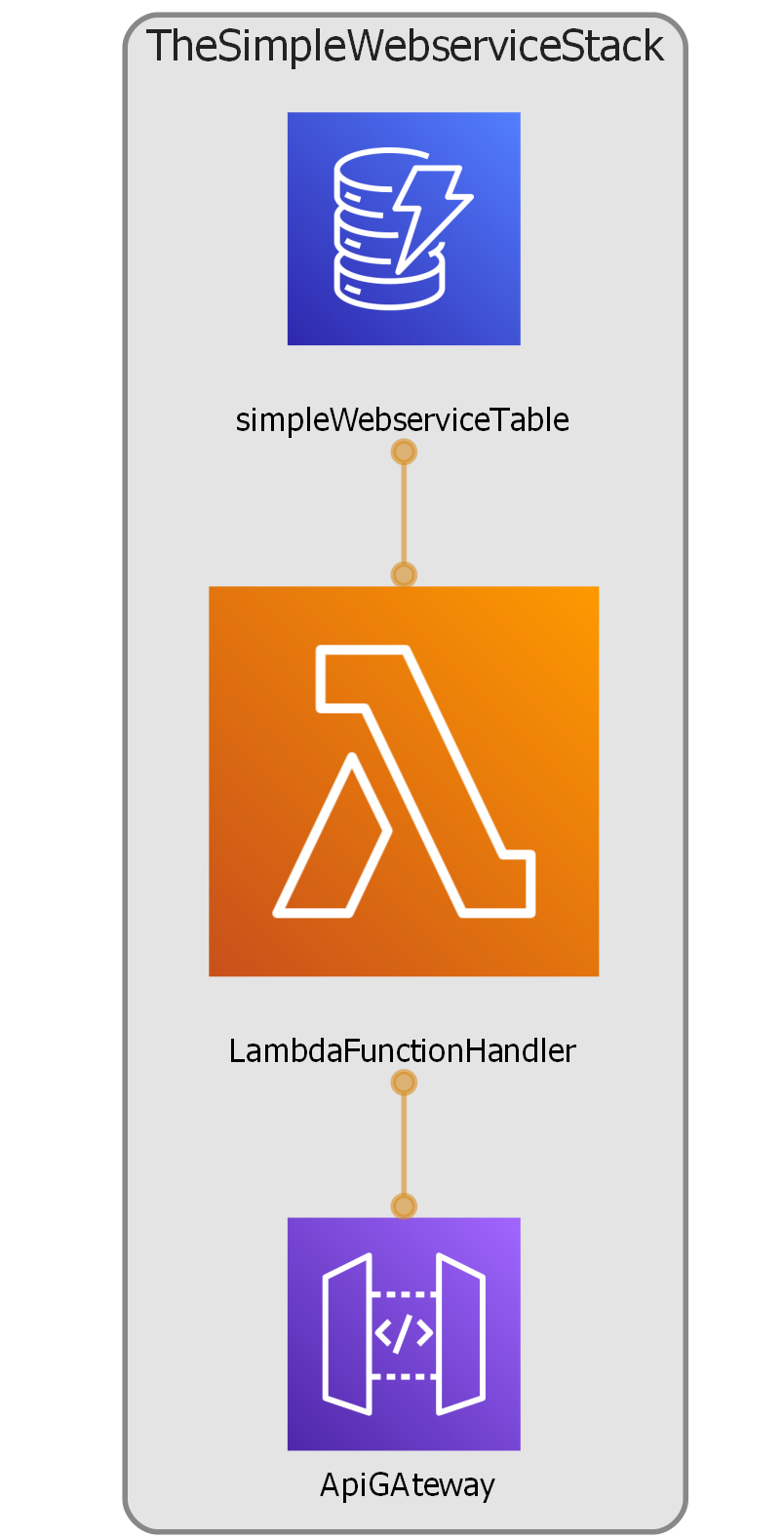
The stack is the same three components
API Gateway – as the network front door,
A Rust Lambda function compiled to ARM64
DynamoDB as the data store.
Prerequisites
You need cargo-lambda installed alongside Rust, and the CDK CLI. If you don’t have them:
# Install Rust (if not already)
curl --proto '=https' --tlsv1.2 -sSf https://sh.rustup.rs | sh

# Install cargo-lambda
pip install cargo-lambda

# Install CDK CLI
npm install -g aws-cdk
Project structure
textlayout
simple-web-service/
├── cdk/                    # CDK TypeScript stack
│   ├── bin/app.ts
│   └── lib/stack.ts
└── lambda/                 # Rust Lambda crate
    ├── Cargo.toml
    └── src/main.rs
The Rust Lambda function
The Lambda crate uses the lambda_http crate from aws-lambda-rust-runtime, and the AWS SDK for Rust to talk to DynamoDB. The function reads a single item with the partition key TEST_ITEM and returns it as JSON.
toml lambda/Cargo.toml
[package]
name = "simple-web-service"
version = "0.1.0"
edition = "2021"

[[bin]]
name = "bootstrap"
path = "src/main.rs"

[dependencies]
lambda_http  = "0.13"
aws-config   = { version = "1", features = ["behavior-version-latest"] }
aws-sdk-dynamodb = "1"
serde_json   = "1"
tokio        = { version = "1", features = ["macros"] }
tracing      = "0.1"
tracing-subscriber = { version = "0.3", features = ["env-filter"] }
rust lambda/src/main.rs
use aws_sdk_dynamodb::Client;
use lambda_http::{run, service_fn, Body, Error, Request, Response};
use serde_json::json;
use std::env;

#[tokio::main]
async fn main() -> Result<(), Error> {
    tracing_subscriber::fmt()
        .with_env_filter(
            tracing_subscriber::EnvFilter::from_default_env()
        )
        .json()
        .init();

    let config = aws_config::load_from_env().await;
    let client = Client::new(&config);

    run(service_fn(|event: Request| {
        let client = &client;
        async move { handler(event, client).await }
    }))
    .await
}

async fn handler(
    _event: Request,
    client: &Client,
) -> Result<Response<Body>, Error> {
    let table = env::var("TABLE_NAME")
        .expect("TABLE_NAME env var must be set");

    let result = client
        .get_item()
        .table_name(&table)
        .key("ID", aws_sdk_dynamodb::types::AttributeValue::S(
            "TEST_ITEM".to_string()
        ))
        .send()
        .await;

    match result {
        Ok(output) => {
            let item = output.item()
                .map(|i| format!("{:?}", i))
                .unwrap_or_else(|| "Item not found".to_string());

            Ok(Response::builder()
                .status(200)
                .header("Content-Type", "application/json")
                .body(json!({ "item": item }).to_string().into())?)
        }
        Err(e) => {
            Ok(Response::builder()
                .status(500)
                .header("Content-Type", "application/json")
                .body(json!({ "error": e.to_string() })
                    .to_string().into())?)
        }
    }
}
Build the Lambda binary
cargo lambda build handles the cross-compilation and produces a bootstrap binary in the format AWS expects. We target ARM64 to match the CDK stack below.
shell
cd lambda
cargo lambda build --release --arm64
The compiled asset lands at lambda/target/lambda/simple-web-service/bootstrap. CDK will zip this up automatically.
CDK infrastructure
The CDK stack is nearly identical to the 2022 original — three constructs, wired together. The main difference is we point lambda.Code at the Rust binary instead of a Node.js bundler, and use Architecture.ARM_64.
typescript cdk/lib/stack.ts
import * as cdk      from 'aws-cdk-lib';
import * as dynamodb from 'aws-cdk-lib/aws-dynamodb';
import * as lambda   from 'aws-cdk-lib/aws-lambda';
import * as apigw    from 'aws-cdk-lib/aws-apigateway';
import { Construct } from 'constructs';
import * as path     from 'path';

export class SimpleWebServiceStack extends cdk.Stack {
  constructor(scope: Construct, id: string, props?: cdk.StackProps) {
    super(scope, id, props);

    // DynamoDB table — identical to 2022 version
    const table = new dynamodb.Table(this, 'SimpleWebServiceTable', {
      tableName:      'simpleWebServiceTable',
      billingMode:    dynamodb.BillingMode.PAY_PER_REQUEST,
      partitionKey:   { name: 'ID', type: dynamodb.AttributeType.STRING },
      removalPolicy:  cdk.RemovalPolicy.DESTROY,
    });

    // Rust Lambda — point at the cargo-lambda build output
    const fn = new lambda.Function(this, 'RustHandler', {
      runtime:      lambda.Runtime.PROVIDED_AL2023,
      architecture: lambda.Architecture.ARM_64,
      handler:      'bootstrap',   // Rust binary name
      code:         lambda.Code.fromAsset(
        path.join(__dirname,
          '../../lambda/target/lambda/simple-web-service')
      ),
      timeout:      cdk.Duration.seconds(10),
      memorySize:   128,           // Rust needs far less RAM than Node
      environment:  {
        TABLE_NAME: table.tableName,
        RUST_LOG:   'info',
      },
    });

    // Grant the Lambda read access on the table
    table.grantReadData(fn);

    // API Gateway — same pattern as 2022
    const gateway = new apigw.RestApi(this, 'ApiGateway');
    const v1  = gateway.root.addResource('v1');
    const api = v1.addResource('get-dynamo-item');

    api.addCorsPreflight({ allowOrigins: apigw.Cors.ALL_ORIGINS });
    api.addMethod('GET', new apigw.LambdaIntegration(fn));
  }
}
Deploy
shell from cdk/
# Bootstrap your account once (if first CDK deploy)
cdk bootstrap

# Deploy
cdk deploy
CDK will print the API Gateway base URL. Your endpoint is at /v1/get-dynamo-item.
Add test data to DynamoDB
Navigate to the DynamoDB console, find simpleWebServiceTable, and add an item with ID = TEST_ITEM and any extra attributes you like. Or use the CLI:
shell aws cli
aws dynamodb put-item \
  --table-name simpleWebServiceTable \
  --item '{
    "ID":    {"S": "TEST_ITEM"},
    "value": {"S": "Hello from Rust!"}
  }'
Hit the API
shell curl
curl https://<your-api-id>.execute-api.eu-west-1.amazonaws.com/prod/v1/get-dynamo-item
What changed from 2022
The pattern is unchanged — the plumbing is identical
Just don’t get left behind with old libraries and languages.
Categories: AWS


Leave a Reply